A tour of Relay
Relay has existed for 10 years at the time of writing, yet unfortunately its adoption hasn’t been widespread. Alternatives like Apollo and URQL - with their perceived lower barrier of entry - have proved much more popular, especially in Apollo’s case.
I think Relay has garnered an unfair reputation of being too complex and esoteric, and as such most people tend to overlook it.
In this post I’ll show how Relay helps avoid common bugs, enables optimal performance, and provides an excellent DX.
The problem
Before we talk about Relay, though, let’s start with an (albeit contrived) example of what data fetching often looks like without it.
export function HomePage() {  const { data, isLoading } = useMeQuery();
  if (isLoading) return <Spinner />;
return ( <main> <Header user={data.me} /> <Greeting name={data.me.firstName} /> <Feed /> </main> );}export function Feed() { const { data, isLoading } = useFeedQuery();
if (isLoading) return <FeedSkeleton />;
return ( <section> {data.feed.posts.map((p) => ( <Post key={p.id} post={p} /> ))} </section> );}export function Post({ post }) { const { data, isLoading } = useCommentsQuery(post.id); if(isLoading) return null return ( <article> <h3>{post.title}</h3> <p>{post.content}</p> <span> {data.comments.length} </span> <Comments comments={data?.comments} /> </article> );}The problem we face here, is client-server waterfalls, that is, children are blocked on the parent’s roundtrip to the server. If we picture it as a diagram it may make more sense.
I’ve made our server quite slow in this example to drive home the point, in a real app while it wouldn’t be as slow (hopefully), it would have many more components in the tree that initiate fetches.

We would be waiting only 350ms if we fetched in parallel, instead we’re waiting 800ms since the children can’t start their requests until they render which can’t happen until the parent’s request has finished.
It isn’t just performance that degrades with this typical fetch-in-render pattern. The UX is also noticeably worse, creating the so called “popcorn UI” - components popping in at different times as their requests complete.
Solving waterfalls
Waterfalls are always going to occur when fetching at the component level, they’re unavoidable.
To solve it, we could - as mentioned above - fetch in parallel. This would mean hoisting the requests up to the root, or if you’re using a modern router, a route loader.
While this would solve our waterfall problem, it leaves us with another big issue.
If a component’s data dependencies do not live with that component, then it becomes much harder to reason about that component in isolation, and makes refactoring significantly more difficult.
So it seems we’re at a bit of a crossroads: either we lose the DX of colocation in pursuit of better performance, or we sacrifice performance for the ability to reason better about our components.
As you have probably guessed, this is where Relay comes in. With Relay, we don’t need to make that choice, we can have our cake and eat it too.
Here’s how it looks in Relay
// generated by relay compilerimport type { homePageQuery } from "../__generated__/homePageQuery.graphql";
export function HomePage() {  // In a real app, we'd initiate the fetch as soon as possible, e.g. in a route loader and read it here with usePreloadedQuery.  const data = useLazyLoadQuery<homePageQuery>(    graphql`      query homePageQuery {        viewer {          ...header          ...greeting        }        ...feed      }    `,    {}  );
return ( <main> <Header headerKey={data.viewer} /> <Greeting greetingKey={data.viewer} /> <Feed feedKey={data} /> </main> );}import type { feed$key } from "../__generated__/feed.graphql";
export function Feed({ feedKey }: {feedKey: feed$key}) { const data = useFragment( graphql` fragment feed on Query { feed(first: 20) { edges { node { id ...post } } } } `, feedKey );
return ( <section> {data.feed.edges.map(({ node: post }) => ( <Post key={post.id} postKey={post} /> ))} </section> );}import type { post$key } from "../__generated__/post.graphql";
export function Post({ postKey }: {postKey: post$key}) { const data = useFragment( graphql` fragment post on Post { title content # so we can access data.comments for comment count comments { __typename } ...comments } `, postKey );
return ( <article> <h3>{data.title}</h3> <p>{data.content}</p> <span>{data.comments.length}</span> <Comments commentsKey={data} /> </article> );}import type { comments$key } from "../__generated__/comments.graphql";
export function Comments({ commentsKey } :{commentsKey: comments$key}) { const data = useFragment( graphql` fragment comments on Post { comments(first: 10) { edges { node { id ...comment } } } } `, commentsKey );
return ( <ul> {data.comments.edges?.map((e) => ( <Comment key={e.node.id} commentKey={e.node}/> ))} </ul> );}Now this is a lot better! We still define our data dependencies in each component, but we do not fetch at the component level, instead we simply declare what fields we want to read via fragments, and the Relay compiler will combine all the fragments into one optimised query.
How does that diagram look now?

Much nicer! The core idea with Relay is that for any given page, there should only be a single network request made. To be more accurate, it should be one query per interaction e.g initial load, navigation, tooltip, dialog etc.
Router integration
For a slightly less contrived example, here is the same home page component integrated with Tanstack Router.
import { createFileRoute } from "@tanstack/react-router";import { graphql, loadQuery, usePreloadedQuery } from "react-relay";import { RelayEnvironment } from "../RelayEnvironment";import type { homePageQuery } from "../../__generated__/homePageQuery.graphql";
const query = graphql`  query homePageQuery {    viewer {      ...header      ...greeting    }    ...feed  }`;
export const Route = createFileRoute("/home-page")({  component: HomePage,  loader: () => ({    queryRef: loadQuery<homePageQuery>(RelayEnvironment, query, {}),  }),});
function HomePage() {  const data = usePreloadedQuery(query, Route.useLoaderData().queryRef);  return (    <main>      <Header headerKey={data.viewer} />      <Greeting greetingKey={data.viewer} />      <Feed feedKey={data} />    </main>  );}
Deferred data
The example above is a huge improvement. It does have one flaw though.
Take the comments field for example. Let’s assume the SQL query is terribly inefficient and needs optimising. In that case, the comments field will take far too long to resolve.
In this scenario, it’s far from ideal to block the rest of the data waiting on comments - they aren’t the most important part of the page. We could be showing the user the data we do have and just show a fallback for comments.
Thankfully Relay and GraphQL provide us with a tool to do that: @defer
@defer is a GraphQL directive that can be applied on a fragment, which will cause it to be omitted from the original response and delivered once it is ready.
So to fix the scenario where comments are blocking the rest of our data we can just do:
const data = useFragment( graphql` fragment post on Post { # everything else ...comments @defer(if:true) } `, postKey );and we can now wrap the comments component in a Suspense boundary to show a fallback:
<Suspense fallback={<CommentsSkeleton />}> <Comments commentsKey={data} /></Suspense>In Relay it isn’t just queries that cause components to suspend, we get fragment level suspense too!
There are also the @stream and @stream_connection directives which are used for Lists and connections respectively which allow us to get a certain amount of initial data, then stream in additional data as it becomes available, although I personally haven’t found much use for it.
gif Defer and stream example
In preparation for this blog post I created a simple demo that makes use of defer, stream and persisted queries.
Here you can see the trending posts streaming in as they resolve and the comments being deferred
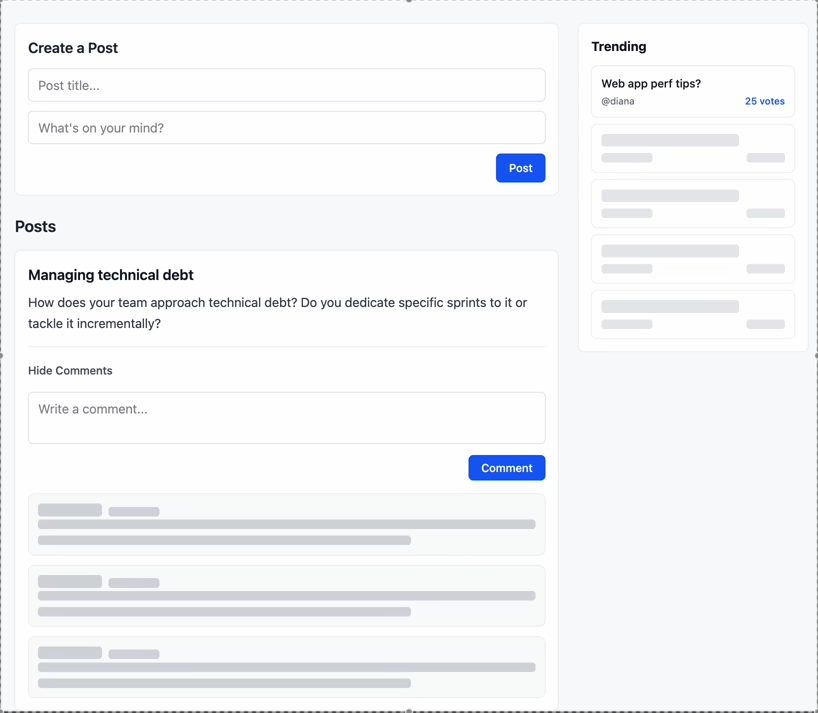
In summary, Relay pushes you towards optimal performance patterns, and can scale as much as you need to. You’re unlikely to need more than what I’ve demonstrated, but on the off chance you do, Relay gives you as much control as you need (Entrypoints, 3D).
Data masking
Data masking is a simple concept but is crucial to how Relay works. Put simply: your component cannot access data that it did not explicitly declare.
Let’s take the home page query and the header fragment as an example, and try and access the username field in both:
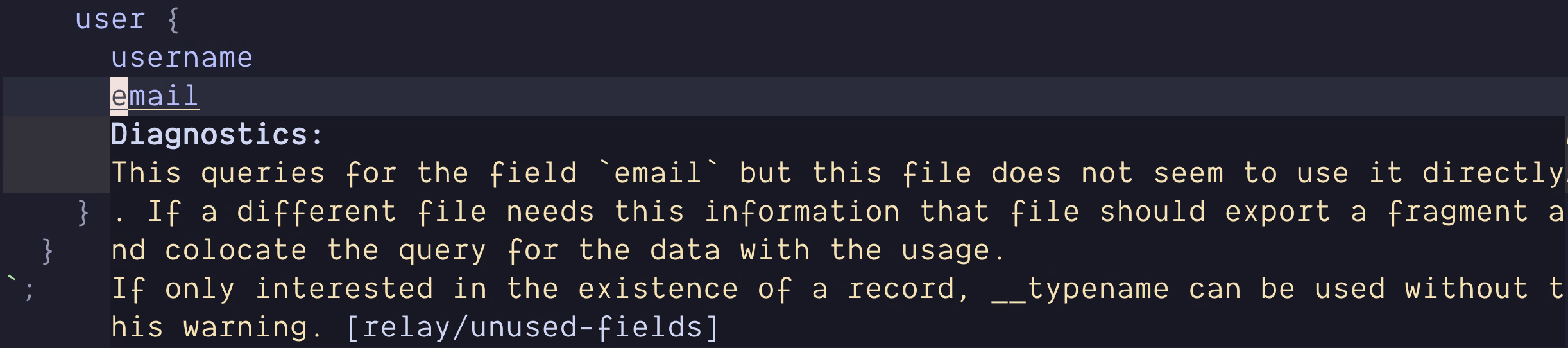
const data = useFragment( graphql` fragment header on User { id username email } `, headerKey ); const username = data.username const data = useLazyLoadQuery<homePageQuery>( graphql` query homePageQuery { viewer { ...header ...greeting } ...feed } `, {} ); const username = data.viewer.username In our header component of course we can access it just fine, as we added it to its fragment. In the home page component on the other hand, we can’t do it. Even though the username field does exist, our home page component didn’t declare it, so it can’t access it.
We therefore get a type error, but it isn’t just at the type level that Relay enforces this, the value also will not exist at runtime except on the fragment(s) that access it.
This is very powerful, it means we can never rely on data implicitly.
Without data masking, if we were to remove a field, we wouldn’t know if another component was using it, and could end up with a runtime error.
This is a big part of how Relay allows you to reason about your components in isolation. You can refactor your components fearlessly as you don’t have to worry about breaking another one.
The Relay (and GraphQL) server specification
To fully harness the power of Relay, your server must abide by certain conventions.
Global Object Identification
Global object identification is what enables Relay to generate the most efficient queries.
The idea is that each object’s ID must be globally unique.
A simple example: we have multiple GraphQL objects. We also use auto-incrementing ids in our database. This will result in multiple objects having the same id e.g
{__typename: "Post", id: 1}{__typename: "User", id: 1}The typical way to solve this isn’t to change how we handle ids in our database. Instead, we just concatenate the type and the id.
The objects then become:
{__typename: "Post", id: "Post:1"}{__typename: "User", id: "User:1"}Global object identification allows us to implement the node query.
The node query is a query that fetches any object that implements the Node interface via its ID, it doesn’t matter what type.
Typically, to fetch some object in GraphQL, your server would have a query like:
type Query { getUserByID(id: Int!): User}and when you have many objects, you end up with something like:
type Query { getUserByID(id: Int!): User getUserByUsername(username: String!): User getPostByID(id: Int!): Post getCommentByID(id: Int!): Comment # and so on...}whereas with the node query:
interface Node {  id: ID!}
type User implements Node {  id: ID!  username: String!}
type Post implements Node {  id: ID!  title: String!  text: String!  user: User}
type Comment implements Node {  id: ID!  text: String!  user: User  post: Post}
type Query {  node(id: ID!): Node}
Okay so clearly the latter is better, but the former is hardly a disaster.
The real benefit is that the node query is a best practice as documented by GraphQL themselves. This means that libraries can build on top of it, and make assumptions about its behaviour, enabling some handy features.
Generating refetchable queries
Let’s take a step back for a second, and think back to our comments fragment from earlier:
fragment comments on Post { comments(first: 10) { edges { node { id ...comment } } }}it’s highly likely we’ll want the comments to have pagination - and we’ll get to that soon - but how would that actually work? How would we fetch the next x comments?
The comments field is not a top level query we can just fetch, it’s a field on a Post. Since all data for a page is fetched in a single network request, does that mean we have to refetch the entire page query just to get the next x comments?
Thankfully not! We have the node query. As I alluded to earlier, there is tooling built that takes advantage of it.
Relay can auto-generate queries for refetching/paginating data, in the above example, it can just generate a query like:
query comments_refetch($id: ID!, $first: String!, $cursor: String) { node(id: $id) { ... on Post { comments(first: $count, after: $cursor) { edges { node { id ...comment } } } } }}this allows us to not worry about how data gets refetched, we can simply trust Relay to generate the most efficient query possible.
Connections
Connections are Relay’s way of modelling paginated lists.
I won’t bore you explaining the entire spec, just what you need to know.
A Connection is an object with 2 fields: edges and pageInfo.
An edge is an object which contains the actual node itself, so for a Post connection the node would be a Post. It also contains the node’s cursor.
pageInfo includes the cursors for forwards and backwards pagination as well as has(next/previous)Page
Seeing an example will make it clear:
type PostCommentsConnection {  edges: [PostCommentsConnectionEdge!]!  pageInfo: PageInfo!}
type PostCommentsConnectionEdge {  cursor: String!  node: Comment!}
type PageInfo {  endCursor: String  hasNextPage: Boolean!  hasPreviousPage: Boolean!  startCursor: String}
Is this really necessary?
It may seem like a pointless convention that only serves to bloat your schema (since GraphQL’s type system doesn’t support generics, you have to define each connection type individually) but the benefits are twofold:
- Much like the node query, convention: Relay knows that any field that implements the Connection spec will behave according to its expectations
- It allows you to model relationships that wouldn’t necessarily be the easiest otherwise.
For example, imagine a friends field on a User type, defined as a connection of Users. We may want to store some metadata about their friendship, such as how long the 2 users have been friends.
But without the Edge data structure, where would it live? It doesn’t really make sense to store it on the User object itself, as that information isn’t a property of the user, it’s a relationship between two users. Edges let us model these kinds of relationships naturally.
type UserFriendsConnection {  edges: [UserFriendsConnectionEdge!]!  pageInfo: PageInfo!}
type UserFriendsConnectionEdge {  friendedAt:DateTime!  cursor: String!  node: User!}
Let’s update our comments fragment to support pagination:
const { data, hasNext, loadNext, isLoadingNext } = usePaginationFragment( graphql` fragment comments on Post @refetchable(queryName: "comments_refetch") # Auto-generated query @argumentDefinitions( count: { type: "Int", defaultValue: 10 } cursor: { type: "String" } ) { comments(first: $count, after: $cursor) @connection(key: "connection_comments") { edges { node { id ...comment } } } } `, commentsKey, );We annotate the fragment with the @refetchable directive, which tells Relay to auto-generate a refetch query. We also add the @connection directive on the comments field, this tells Relay that this field implements the Connection spec.
Now let’s just wire up the actual refetching:
<div>  {data.comments.edges?.map((e) => (    <Comment key={e.node.id} commentKey={e.node} />  ))}
  {hasNext && (    <button onClick={() => loadNext(10)} disabled={isLoadingNext}>      {isLoadingNext ? "Loading..." : "Load more comments"}    </button>  )}</div>
That’s it!
In other GraphQL clients you’d have to define your merging logic for the incoming and existing data. With Relay, it just works™ .
Notice also how we don’t need to pass the cursor variable to loadNext. Because we comply with the Connection spec, Relay knows there’s a PageInfo field on the connection (even if we don’t explicitly request it, Relay does), which holds the next cursor, so there’s no need to manually specify it.
That’s it for the GraphQL server specification. There was another part of the Relay spec for mutations that essentially just meant that all mutations must use input objects and include a clientMutationID, but it is no longer required.
You may be thinking that complying with both these specs will be a pain. It varies from being semi irritating and a slog to implement yourself, to an absolute breeze when using the right library.
But even if you’re working in a very obscure stack, hand rolling it all yourself isn’t that bad, I’d definitely recommend using a library that abstracts it away if possible though.
I currently use Pothos as my GraphQL schema builder, and it has an excellent Relay plugin. It also has ORM/Query builder plugins that integrate with the Relay plugin, making conforming to both specs completely painless.
Pothos is way out of scope for this post, but just to show how easy it can be, here is a snippet that adheres to both the Global Object Identification and Connection spec:
// prismaNode creates a Post object that implements the Node interfacebuilder.prismaNode("Post", { id: { field: "id", }, fields: (t) => ({ title: t.exposeString("title"), text: t.exposeString("text"), user: t.relation("user"), comments: t.relatedConnection("comments", { cursor: "id", query: { orderBy: { createdAt: "desc", }, }, }), }),});Mutations
If you’re coming from another GraphQL client, then mutations will be very familiar, but Relay takes them to the next level.
Much like any other client with a normalised cache, returning the updated data with the ID will automatically update that item in the cache, no manual work required.
const [editComment] = useMutation<editCommentMutation>(graphql`  mutation editCommentMutation($input: MutationEditCommentInput!) {    editComment(input: $input) {      id      ...comment    }  }`);
// in an event handler somewhereeditComment({  variables: {    input: {      id: data.id,      text: "Updated comment!",    },  },  onCompleted: () => setEditing(false),});
Declarative mutation directives
We’ve seen that just like other clients, Relay will update an object in the store for you if you return the id and updated fields in the mutation.
What if we want to add an item to the store though? Instead of editing a comment, we want to post one.
How will that work? Especially now we have pagination set up with connections?
Not to worry, it’s also very easy.
We’ll once again define our mutation:
const [comment] = useMutation<createCommentMutation>(graphql` mutation createCommentMutation( $input: MutationCreateCommentInput! $connections: [ID!]! ) { createComment(input: $input) @appendNode( connections: $connections edgeTypeName: "PostCommentsConnectionEdge" ) { id ...comment } } `);We now accept a connections argument, this isn’t for the mutation itself, it doesn’t get sent to the server, it’s for Relay.
We also add the @appendNode directive to the createComment field. It makes use of the connections variable, and we pass it an edgeTypeName so Relay knows what edge to create.
We can now call our mutation:
  // in an event handler somewhere  const connectionID = ConnectionHandler.getConnectionID(      postId,      "connection_comments",    );
    comment({      variables: {        connections: [connectionID],        input: {          postId,          text,        },      },    });
We need to get the connection ID so Relay can add the item to the correct connection. Since comments is a field on Post, we need the Post ID to identify the right one. We also pass the connection key from the @connection directive we added earlier.
And that’s it, no messing about with the store to manually add items to the connection, just apply a directive to the mutation and we’re good!
If you don’t want to have to add the edgeTypeName, you can return an edge from the mutation instead, and use @appendEdge instead of @appendNode.
There are more than just @appendNode and @appendEdge, for prepending we can use @prependNode and @prependEdge. For deleting we can use @deleteEdge.
While these directives are very useful, you’ll probably run into situations where they don’t seem to be working.
This will be down to the connection field accepting more than just the connection arguments (first, last, cursor, etc). This is fine, you just need to make sure to provide those arguments to getConnection/getConnectionID.
Say we accepted a sortBy argument for our comments field:
type Post { # all the other fields... comments( after: String before: String first: Int last: Int sortBy: String ): PostCommentsConnection}we’d have to make sure to do:
const connectionID = ConnectionHandler.getConnectionID( postId, 'connection_comments', { sortBy } ); comment({ variables: { connections: [connectionID], input: { postId, text, }, }, });If you still can’t fix it, use the Relay dev tools, they have a list of all the connections so you should be able to see how you’re going wrong by comparing the connection string you are creating vs the one in the store.
What if I need more manual control?
As there are situations where you may need more control, Relay also allows imperative updating of connections like:
const post = store.get(postId);const comments = ConnectionHandler.getConnection( post, "connection_comments");const newComment = store.get(newCommentId);const edge = ConnectionHandler.createEdge( store, comments, newComment, "PostCommentsConnectionEdge");
if (someCond) {// add to end of connection ConnectionHandler.insertEdgeAfter(comments, edge);} else {// add to start of connection ConnectionHandler.insertEdgeBefore(comments, edge);}
Persisted queries
Any GraphQL detractor will rightfully point out the security risk of anybody being able to send arbitrary queries to your server. There are mitigations for this, such as limiting query complexity or rate limiting but none of these are sufficient.
What you should do is use persisted queries. This will prevent bad actors from issuing arbitrary operations.
Persisted queries are an allowlist of GraphQL operations generated by your client, anything else gets rejected.
When enabled, the Relay compiler creates a JSON file of allowed queries, mapping a hash to the actual query text. Your client sends the hash instead of the query text, and your server verifies it’s valid by checking if the hash exists in the object.
Let’s enable it:
{ "src": "./src", "language": "typescript", "schema": "../server/src/graphql/schema.graphql", "exclude": ["**/node_modules/**", "**/__mocks__/**", "**/__generated__/**"], "noFutureProofEnums": true, "artifactDirectory": "./src/__generated__", "persistConfig": { "file": "../server/persisted_queries.json", "algorithm": "MD5" }}Now our request body goes from this:
{ "query": "query homePageQuery { viewer { ...header ...greeting } ...feed }", "variables": {}}to this:
{ "extensions": { "persistedQuery": { "version": 1, "sha256Hash": "52e01704816e81649968e1e5dafcd028" } }, "variables": {}}Testing
Relay provides a package - relay-test-utils - to facilitate integration testing Relay components. This is by far the weakest part of Relay, in my experience. There’s a ton of boilerplate, the docs aren’t great, and often tests will fail for seemingly no reason.
The most common cause of failing tests is probably the incorrect operation being mocked with no clues as to why. This seems to happen a lot when a subscription fires after a mutation.
I got very used to diving into Relay’s source to try and figure out why this was happening, and while this eventually worked most of the time, it made writing tests way too time consuming.
All of this pushed me to write many more E2E tests instead, ironically they were much less brittle!
Testing examples
Here is what testing Relay components look like when testing a component that uses usePreloadedQuery:
it('should update after user edits post', async () => {  const env = createMockEnvironment();
  env.mock.queueOperationResolver((operation) =>    MockPayloadGenerator.generate(operation, {      Post: () => ({        id: 'post-1',        title: 'hello',        content: 'some content',        createdAt: new Date().toISOString(),        // any field that you leave out, relay will mock automatically        // below value would be '<mock-value-for-field-"isDeleted">'        // so anything that would be falsy by default, becomes truthy        isDeleted: false,        isPoster: true,        comments: {          edges: []        },      })    })  );
  env.mock.queuePendingOperation(singlePostQuery, {});
  const { user } = renderRoute({    route: '/post/post-1',    env  });
  await screen.findByText(/some content/i);
  await user.click(screen.getByText(/edit/i));  await user.clear(screen.getByTestId("create-or-edit"));  await user.type(screen.getByTestId("create-or-edit"), "edited");  await user.click(screen.getByRole('button', { name: /save/i }));
  act(() =>    env.mock.resolveMostRecentOperation((operation) =>      MockPayloadGenerator.generate(operation, {        Post: () => ({          id: 'post-1',          content: 'edited'        })      })    )  );
  return expect(await screen.findByText(/edited/i)).toBeInTheDocument();});
and here is what it looks like when testing just a component that uses useFragment:
  it('should delete the post ', async () => {  const Wrapper = () => {    const data = useLazyLoadQuery<postFeedQuery>(      graphql`        query postFeedQuery {          ...feed @arguments(sortBy: NEW)        }      `,      {}    );
    return <Feed feedKey={data} />;  };
    const { env, user } = render(<Wrapper />);
    act(() =>      env.mock.resolveMostRecentOperation((operation) =>        MockPayloadGenerator.generate(operation, {          User: () => ({ id: 'user-1' }),          UserPostsConnection: () => ({            edges: [              {                node: {                  id: 'post-1',                  title: 'hi',                  isDeleted: false,                  content: 'hi',                  createdAt: new Date().toISOString(),                  isPoster: true                }              }            ]          })        })      )    );
    const button = await screen.findByText(/delete/i);    await user.click(button);    await user.click(screen.getByRole('button', { name: /delete post/i }));
    act(() => {      env.mock.resolveMostRecentOperation((operation) =>        MockPayloadGenerator.generate(operation, {          Post: () => ({ id: 'post-1' })        })      );    });
    expect(button).not.toBeInTheDocument();  });
We create a wrapper component that gets the mock data and renders the component we want to test while passing its fragment reference.
The Bad
While we’re on a negative note, let’s get all the bad stuff out the way.
-
The docs - while significantly better than they used to be a few years ago - aren’t great, and are particularly lackluster around more advanced features.
-
There is no SSR integration for Relay. At best there are a couple of (very helpful) POCs on GitHub. This is disappointing given alternatives like Apollo and Tanstack Query both provide their own integrations, whereas Relay, created by Facebook, has nothing.
-
It has a significant impact on bundle size, especially due to the generated artifacts, unfortunately persisted queries do little to help.
-
It has a mandatory compiler step.
-
Testing (see above).
Tooling
Relay has great tooling built around it, it has an ESLint plugin to ensure you’re following the best practices and avoiding anti-patterns, plus an LSP which makes the editor experience super polished.
ESLint plugin
To use it, just install eslint-plugin-relay and enable it in your ESLint config.
Here are a couple of examples of it:

Relay LSP
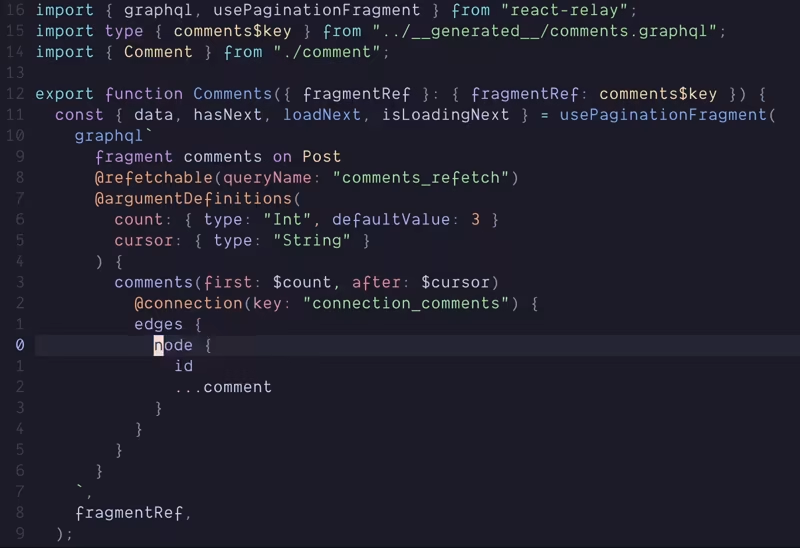
If you’re using VSCode then it’s as easy as installing the Relay extension. If like me you’re using neovim, then you need to setup the Relay LSP in your config along with all your others.
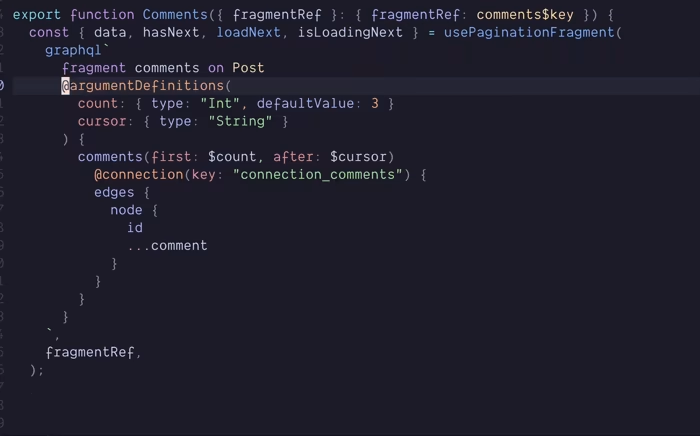
Like any LSP, this enables nice tooling in your editor.
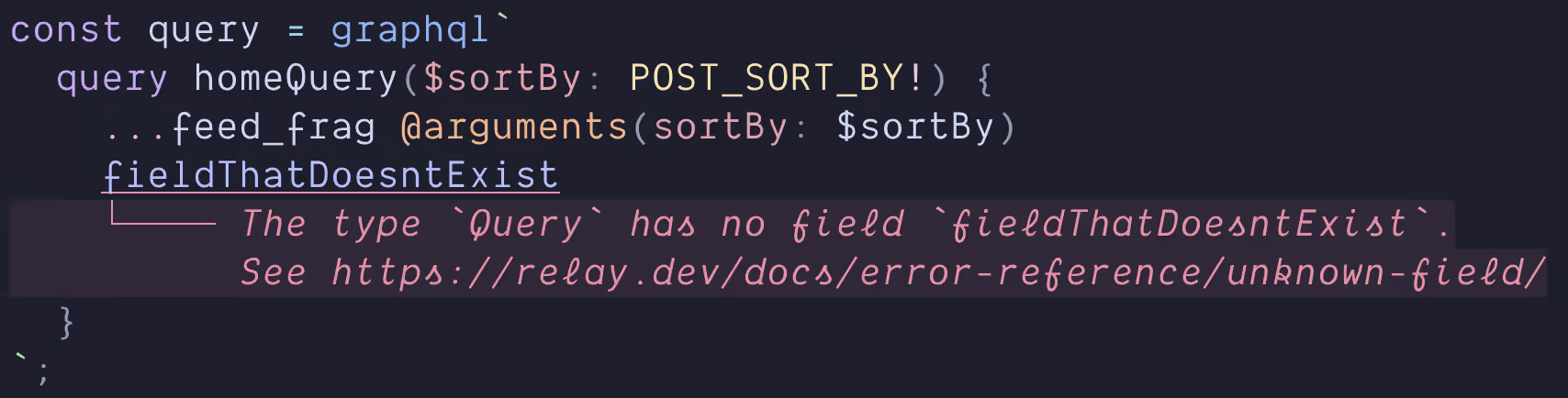
Wrapping up
This was by no means an exhaustive look at Relay, but hopefully it helped you understand what it does for you in comparison to other solutions. If you are interested in learning it I’d suggest the following resources:
-
Re-introducing Relay - an excellent introduction to Relay from React Conf 2021
-
The Relay tutorial - probably the best of the Relay docs
If you’ve been put off by bad docs or its complex reputation, I encourage you to give Relay a shot. Other tools are arguably easier to get started with, but Relay is much easier to use.